Grocery List API: Automate Your Lists With LystBot's REST API
I've tried every grocery list app on the market. Not one of them has a grocery list API. Seriously. I spent a weekend looking. AnyList, OurGroceries, Bring - all walled gardens. Your list lives inside one app, on one device, behind one interface. You can't script it, you can't hook it into your smart home, you can't build a Slack bot that adds "oat milk" when someone types /groceries add oat milk.
So we built LystBot as a grocery list app with full API access. A real REST API: Bearer token auth, JSON in and out, predictable endpoints. If your thing speaks HTTP, it can manage your lists.
This post walks through how to automate grocery lists with working curl commands you can copy-paste, then gets to the fun part: four automations that turn a list app into something programmable.
TL;DR: Grocery list API in 60 seconds
- Download LystBot and grab your API key from Settings
- Create a list:
curl -X POST https://lystbot.com/api/v1/lists -H "Authorization: Bearer YOUR_KEY" -H "Content-Type: application/json" -d '{"title":"Groceries","type":"shopping"}' - Add items:
curl -X POST https://lystbot.com/api/v1/lists/LIST_ID/items -H "Authorization: Bearer YOUR_KEY" -H "Content-Type: application/json" -d '{"items":["Milk","Eggs","Bread"]}'
Items sync to every phone on the list instantly. Read on for the full endpoint reference and four real automation setups.
Why a programmable list app beats a regular list app
Think about when you actually add items to a grocery list. You're cooking and realize you're out of cumin. You're reading a recipe and need six ingredients. Your smart home detects the washing machine finished. You're in Slack and someone mentions needing printer paper for the office.
None of these moments happen inside a list app. They happen everywhere else. An API lets you capture items where the thought occurs instead of forcing you to context-switch, open an app, type it in, and lose your train of thought.
Three scenarios where you need a grocery list API:
A recipe parser scrapes ingredients from a URL and dumps them straight into your shared grocery list. Your partner sees the items appear on their phone before you've even closed the browser tab.
A smart home trigger fires when your Philips Hue motion sensor hasn't detected movement in the pantry for a while, or when your smart plug detects the washing machine stopped. It adds "hang laundry" to your todo list automatically.
A Slack bot lets your whole team manage an office supply list without anyone downloading yet another app.
Grocery list API: core endpoints
Base URL: https://lystbot.com/api/v1
You authenticate with a Bearer token. Grab your API key from the app settings (more on that below). Every request needs this header:
Authorization: Bearer YOUR_API_KEY
Here are the endpoints you'll use most.
Create a list
curl -X POST https://lystbot.com/api/v1/lists \
  -H "Authorization: Bearer YOUR_API_KEY" \
  -H "Content-Type: application/json" \
  -d '{
    "title": "Weekly Groceries",
    "emoji": "🛒",
    "type": "shopping"
  }'
Response:
{
  "id": "a1b2c3d4-e5f6-7890-abcd-ef1234567890",
  "title": "Weekly Groceries",
  "emoji": "🛒",
  "type": "shopping",
  "created_at": "2026-03-26T10:00:00Z"
}
List types are shopping, todo, packing, and generic. Pick whichever fits.
Add items
curl -X POST https://lystbot.com/api/v1/lists/LIST_ID/items \
  -H "Authorization: Bearer YOUR_API_KEY" \
  -H "Content-Type: application/json" \
  -d '{
    "items": ["Oat milk", "Bananas 6x", "Sourdough bread"]
  }'
You can batch items in a single request. The app's smart parser handles quantities, so "Bananas 6x" works the way you'd expect.
Check off an item
curl -X PUT https://lystbot.com/api/v1/lists/LIST_ID/items/ITEM_ID \
  -H "Authorization: Bearer YOUR_API_KEY" \
  -H "Content-Type: application/json" \
  -d '{"checked": true}'
Generate a share code
curl -X POST https://lystbot.com/api/v1/lists/LIST_ID/share \
  -H "Authorization: Bearer YOUR_API_KEY"
Returns a 6-character code anyone can use to join the list. No account creation needed on their end.

The full endpoint reference is in the LystBot docs. There are also endpoints for updating lists, deleting items, clearing checked items, and managing your profile. But the four above cover 90% of what automations need.
Want to try it right now? Download LystBot, go to Settings, copy your API key, and run the curl commands above. Takes under a minute.
Automate grocery lists: four real setups
This is the part I actually care about. The API is just plumbing. What matters is what you build on top.
I run all four of these myself. The cron job one was first, born out of annoyance: every Sunday I'd manually type the same 8 staples into my grocery list. Week after week. Automating that took 10 minutes and saved me a small but real chunk of mental overhead. Each of these works because LystBot is a list app for developers, not a consumer app with an API bolted on as an afterthought.
1. Recipe to grocery list (Zapier or n8n)
The idea: You star a recipe in Pocket (or Instapaper, or save a bookmark). An automation parses the ingredients and adds them to your shared grocery list.
In n8n, the flow looks like this:
- Trigger: New starred item in Pocket
- HTTP Request: Fetch the recipe page
- AI node: Extract ingredient list from the HTML (GPT or Claude work fine here)
- HTTP Request: POST to
https://lystbot.com/api/v1/lists/YOUR_LIST_ID/itemswith the ingredients array
The LystBot API accepts an array of items in one call, so you don't need to loop. One request, all ingredients land on the list. Your partner gets a push notification with the new items.
If you're using Zapier instead of n8n, the same flow works with their Webhooks action for the API calls.
2. Weekly grocery list from a template (cron job)
The idea: Every Sunday morning, a script creates a fresh grocery list pre-filled with your staples.
#!/bin/bash
API_KEY="YOUR_API_KEY"
BASE="https://lystbot.com/api/v1"

# Create this week's list
LIST_ID=$(curl -s -X POST "$BASE/lists" \
  -H "Authorization: Bearer $API_KEY" \
  -H "Content-Type: application/json" \
  -d "{
    \"title\": \"Groceries $(date +'%b %d')\",
    \"emoji\": \"🛒\",
    \"type\": \"shopping\"
  }" | jq -r '.id')

# Add staples
curl -s -X POST "$BASE/lists/$LIST_ID/items" \
  -H "Authorization: Bearer $API_KEY" \
  -H "Content-Type: application/json" \
  -d '{
    "items": [
      "Milk",
      "Eggs",
      "Bread",
      "Bananas",
      "Chicken breast",
      "Rice",
      "Onions",
      "Olive oil"
    ]
  }'

echo "Created list: $LIST_ID"
Drop this in a crontab (0 8 * * 0 for Sundays at 8am) and you've got a way to automate your shopping list every week. You wake up, your grocery list is already started. Add whatever else you need during the week.
You could keep the template items in a JSON file and read from that, so editing your staples doesn't mean editing the script.
3. Slack bot for shared lists
The idea: Type /groceries add milk, eggs, bread in Slack and the items appear on your shared list.
A minimal Slack slash command handler in Node.js:
const express = require('express');
const app = express();

const API_KEY = process.env.LYSTBOT_API_KEY;
const LIST_ID = process.env.LYSTBOT_LIST_ID;

app.use(express.urlencoded({ extended: true }));

app.post('/groceries', async (req, res) => {
  const text = req.body.text; // "add milk, eggs, bread"
  const items = text.replace(/^add\s+/i, '').split(',').map(i => i.trim());

  await fetch(`https://lystbot.com/api/v1/lists/${LIST_ID}/items`, {
    method: 'POST',
    headers: {
      'Authorization': `Bearer ${API_KEY}`,
      'Content-Type': 'application/json'
    },
    body: JSON.stringify({ items })
  });

  res.json({ response_type: 'in_channel', text: `Added: ${items.join(', ')}` });
});

app.listen(3000);
Register this as a Slack slash command, point it at your server, done. Everyone in the channel can add to the grocery list. The list syncs to the LystBot app on everyone's phone who's joined it.
Works for office supplies, team lunches, event planning. Anything where a group needs a shared list but you don't want to force another app installation. This is REST API list management without anyone on the team needing to touch the actual app.
4. Home Assistant automation
The idea: When the washing machine finishes (detected by a smart plug's power dropping below 5W), add "hang laundry" to your todo list.
Home Assistant's REST command integration makes this simple. Here's the automation YAML:
automation:
  - alias: "Washing done - add to todo"
    trigger:
      - platform: numeric_state
        entity_id: sensor.washing_machine_power
        below: 5
        for:
          minutes: 2
    action:
      - service: rest_command.lystbot_add_item
        data:
          items: '["Hang laundry"]'
And the REST command config:
rest_command:
  lystbot_add_item:
    url: "https://lystbot.com/api/v1/lists/YOUR_TODO_LIST_ID/items"
    method: POST
    headers:
      Authorization: "Bearer YOUR_API_KEY"
      Content-Type: "application/json"
    payload: '{"items": }'
You can use the same pattern for any sensor or state change. Doorbell rings while you're away? Add "check doorbell recording" to your todo. Fridge temperature sensor spikes? Add "check fridge" to the list. I've forgotten wet laundry in the machine overnight more times than I'd like to admit. This automation fixed that. The API doesn't care where the HTTP request comes from.
Production tips for your todo app REST API setup
If you're running automations that fire unattended, a few things to keep in mind.
Error handling. The API returns standard HTTP status codes. 200 for success, 404 if a list or item doesn't exist, 401 if your key is wrong. Wrap your curl calls in a check for non-2xx responses before moving on. In bash, curl -f exits with a non-zero code on HTTP errors.
Idempotent adds. The add-items endpoint appends, so calling it twice adds duplicates. If your automation might retry (n8n retries on timeout, cron jobs can overlap), either check the list contents first or deduplicate on your side. A simple approach: keep a local log of what you added and skip items that are already on the list.
Token rotation. Your API key is tied to your device. If you share it with a script running on a server and later want to revoke access, generate a new key from the app. The old one stops working immediately. Don't hardcode keys in version-controlled files. Use environment variables or a secrets manager.
Rate limits. The API doesn't enforce strict rate limits right now, but don't hammer it. If you're adding items in a loop, batch them into one request instead of firing 50 individual POSTs. The items endpoint accepts arrays for exactly this reason.
Authentication
Getting your API key takes about five seconds.
- Open LystBot
- Go to Settings
- Your API key is right there
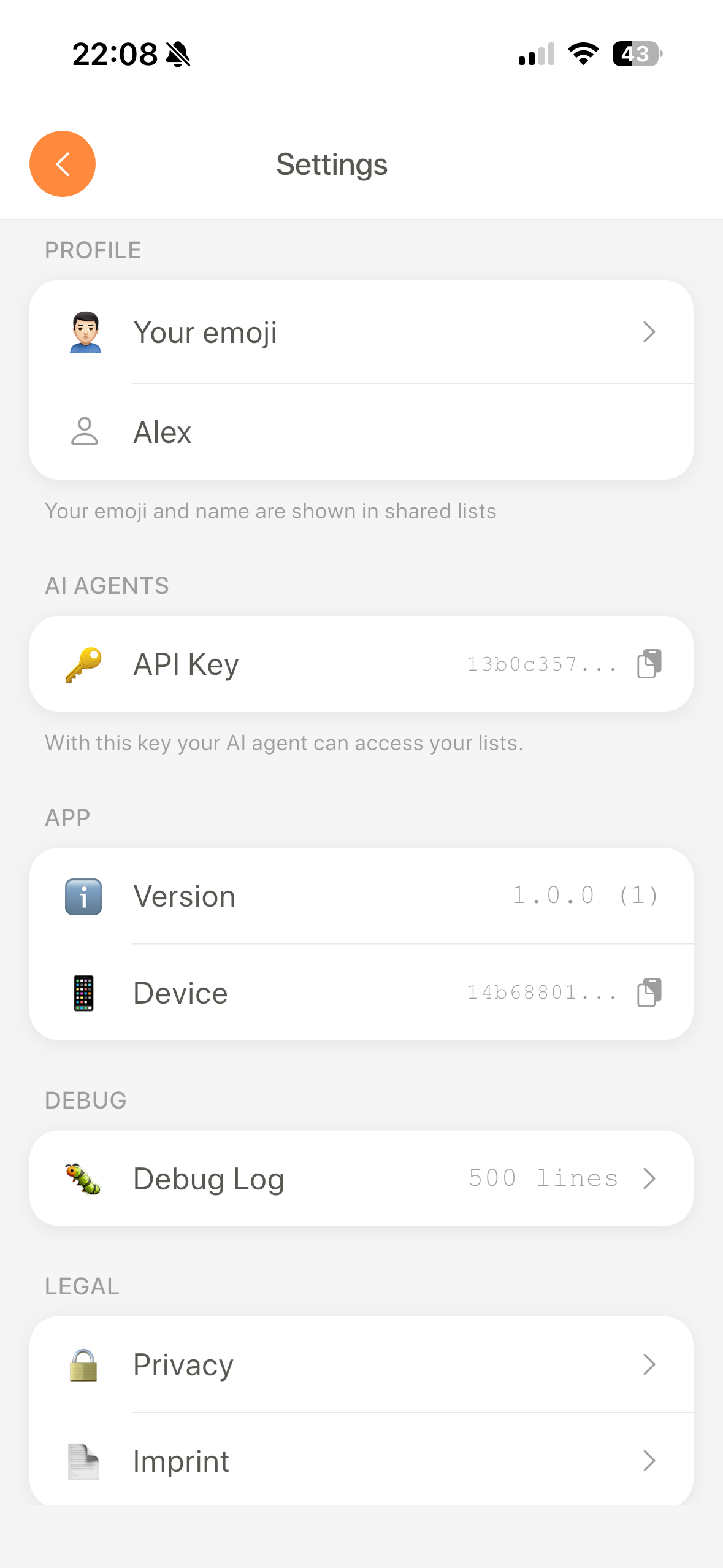
Send it as a Bearer token in every request:
Authorization: Bearer YOUR_API_KEY
No OAuth. No token refresh. No scopes. One key, full access to your lists. If you're building something for other people, each user gets their own key from their own app.
The key is a 64-character hex string tied to your device. If you ever need to rotate it, generate a new one from the app.
Beyond the API: CLI and MCP server
The REST API is one way in. There are two more.
CLI: Run npx lystbot and you have a terminal client. No global install, no setup beyond your API key. We wrote about this in the feature overview post.
npx lystbot lists
npx lystbot add "Groceries" "Tomatoes, Basil, Mozzarella"
Pipe output to jq, feed it to scripts, use it in CI/CD if that's your thing.
MCP Server: If you use Claude Desktop, Cursor, or any MCP-compatible AI tool, LystBot has an MCP server that lets your AI assistant manage your lists directly. "Add the ingredients for pad thai to my grocery list" just works. We covered 10 real MCP server use cases if you want ideas for what else to connect.
The three interfaces (API, CLI, MCP) all talk to the same backend. Items added via curl show up in the app instantly. Items checked off in the app disappear from the CLI output. Everything syncs.
Go build something
LystBot is free. The API is free. No paid tiers to unlock endpoints, no OAuth setup to wrestle with.
- Download LystBot (App Store / Google Play)
- Grab your API key from Settings
- Run that first curl command. Create a list, add an item, see it appear on your phone.
Then pick one of the automations above and make it yours. The API docs have the full endpoint reference. If you build something cool, we want to hear about it.